Hi Eddie,
Create Apple Mail Backup is not a hectic task you just need to export complete mailbox of a user accounts.
Follow the mention steps:
1. First Login to Apple Mail user account.
2. Select a Mailbox for backup.
3. Right click on the selected Mailbox and choose Export Mailbox.
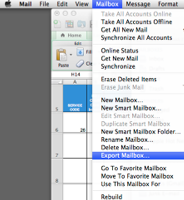
4. Navigate location where you want to save Apple Mail Backup.
5. Select Desktop option then click on Choose button to finalize.
The above mention steps will help to create the backup of Apple Mail. Save complete mailbox items like emails, contacts, calendars, etc.
Hope the information will help you!